
Their are two major Radio-Computer connection channels, CAT and Audio...
CAT is what allows an application to communicate with the radio's VFO, setting and reading frequencies and modes. Almost all Amateur radios (excluding the new LAN based radios) operate CAT communication over a very old RS-232 protocol - even if the radio is using a modern USB interface, the protocol is still 60 year old RS-232 over USB. Unlike modern self-configuring devices the setup parameters found in the Radio's menus must match the settings in the application preferences exactly. This can be challenging to get right the first time but the application should remember the settings for you after that.
Since most older radios have old style TTL or RS-232 connections for this channel and most computers have abandoned these old style serial ports, we need to add a USB-to-Serial adapter to the computer. This is usually a simple piece of hardware (UART) accompanied by a Mac software driver that allows the application to "see" the radio connected to this device. The device may also include level converters to convert the RS-232 to the TTL level required by the (older) radio and sometimes DTR and RTS lines to also let the computer key the radio's PTT and CW lines.
Some devices combine the above capabilities with digital CW generators and or sound cards (modems) for the Audio channel.
Some radios have the USB/Serial adapters built in and only require a USB cable connecting them to the computer but still require a Mac driver to be installed.
The audio channel allows the computer to send pre-recorded speech or digitally encoded information (RTTY, PSK etc.) to the radio's microphone or accessory jack as well as receive digitally encoded data from the radio's headphone or accessory jack for decoding. Some radios have this sound card capability built into the radio and it can be accessed over the same USB cable as the CAT channel. Sound cards on the Mac do not normally require a driver to be installed and can be configured in the Mac System Preferences Sound panel.
If you don't see the USB/Serial adapter port connected to your radio in the Port popup (or all you see is a Bluetooth port) then it could be one of the following:
You can tell which chip set is being used in your adapter/radio by selecting "About This Mac / Overview / System Report / Hardware / USB. If the UART shows up in the Hardware/USB report It means that it is plugged in and powered up - not that a driver is necessarily loaded. Once you have identified the UART Chip set (FTDI, Silicon Labs, Prolific, Keyspan/Tripplite, RT Systems etc.) you can download and install the Mac driver from the manufacturers web site.
The USB/UART Bridge chip inside the Icom, Yaesu and Kenwood radios is a Silicon Labs USB to UART Bridge Controller and the Mac drivers are available here.
The USB/UART Bridge chip inside the Eagle, K3S and KX3 is an FTDI USB to UART Bridge Controller and the Mac drivers are available here.
Note: macOS built in FTDI driver: Supports FTDI based devices with standard VID/PID combinations.
"Since 10.9 (Mavericks), OS X has included
built-in partial support for some FTDI devices in VCP mode.
Starting with 10.11 (El Capitan), Apple’s own driver seems to
be sufficiently comprehensive that many customers will not
need to install FTDI’s own VCP unless they wish to use its
advanced features such as baud-rate aliasing and configurable
latency times"
.
Before
macOS Big Sur, you can tell which driver is installed and loaded
by selecting "About This Mac / Overview / System Report / Software
/ Extensions. and looking for the kernel
extension that matches the adapter chip set (eg FTDI, Silicon
Labs, Prolific etc.) It’s important that the driver is Loadable
and Signed. It will only show as Loaded
when the device is powered up and plugged in.
Don’t forget that the System Report does not
automatically refresh and can take up to a minute to display all
the extensions. If you want to see if a change you made
(plugging/unplugging/changing usb ports etc.) has caused the
driver to load then you have to go through the system report
steps again - or run the application and look at the debug log
for the loaded driver.
With
macOS Big Sur and later, you can tell which DriverKit
extensions are loaded with the Terminal command $
systemextensionsctl list
com.apple.system_extension.driver_extension
Make sure you have the correct version of the driver installed for your version of macOS - for example, the latest Silicon Labs driver will not work with macOS 10.9 or 10.10 and you need to install their legacy driver.
Radio still not showing up ?
Other things to try...
Drivers
(kernel extensions) can be tricky to install on High
Sierra (and later) if you are doing it for the first
time, but if you want to communicate with your radio using MacLoggerDX,
MacDoppler or any other Ham Radio software you
will need to install the driver supplied by the manufacturer of
the UART in your radio or radio adapter. It is not possible for
MacLoggerDX or MacDoppler to do this for you.
Note:
macOS built
in FTDI driver:
"Since 10.9 (Mavericks), OS X has included
built-in partial support for some FTDI devices in VCP mode.
Starting with 10.11 (El Capitan), Apple’s own driver seems to
be sufficiently comprehensive that many customers will not
need to install FTDI’s own VCP unless they wish to use its
advanced features such as baud-rate aliasing and configurable
latency times" .
Starting with OS X Mavericks, Apple has been making changes to how third party kernel extensions are allowed to work. On macOS High SIerra and later, kernel extensions must be digitally signed using an Apple Developer ID and installed into /Library/Extensions enforced by System Integrity Protection. Kernel extensions will not load unless authorized to do so by a logged-in user.
User-Approved Kernel Extension Loading
macOS High Sierra 10.13 introduces a new feature that requires user approval before loading new third-party kernel extensions. (Approval is automatically granted to third-party KEXTs that were already present when upgrading to macOS High Sierra).
When a request is made to load a KEXT that the user has not yet approved, the load request is denied and macOS presents this alert.
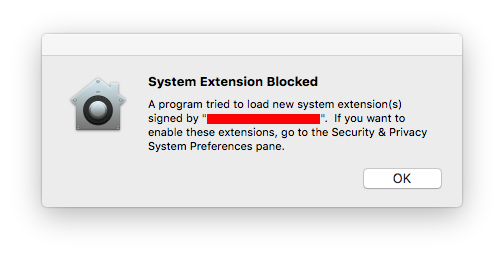
This
prompts the user to approve the KEXT in System Preferences /
Security & Privacy / General.
You will have to enter your credentials after clicking the lock
in the lower left corner to enable the Allow button.

This approval UI is only present in the Security & Privacy preferences pane for 30 minutes after the alert. Until the user approves the KEXT, future load attempts will cause the approval UI to reappear but will not trigger another user alert..
Once
approved, the KEXT will immediately be loaded or added to the
prelinked kernel cache, depending on what action was blocked.
Subsequent requests to load the KEXT will proceed silently as on
previous macOS versions.
Warnings for Legacy System Extensions started to appear on reboot after installing macOS 10.15.4