
The Specific Calls check box will use the Alarm notification method selected in the Alarms Popup if a call in the comma delimited list is received on the cluster or is a DX de spotter. You can enter a list of calls separated by commas as well as keywords which MacLoggerDX will look for in the dxcluster comments and band fields. the * wildcard is allowed for the spot call sign match, i.e. PJ2* or */PJ2. Note: when you are finished editing the list, tab out or press return to save it.
The Speak all DX Cluster spots check box will cause all filtered DX Cluster spots to be spoken.
The Specific DXCC Country popup will use the Alarm notification method selected in the Alarms Popup if the selected dxcc id is received on the cluster..
The DXCC NOT in Log and DXCC NOT Confirmed in Log checkboxes will use the Alarm notification method selected in the Alarms Popup if that dxcc id is received on the cluster. These alarms do not require Auto Lookup to be enabled.
If certain other criteria are met (CQ Zone, State, IOTA) MacLoggerDX will use the Alarm notification method selected in the Alarms Popup. These alarms require Auto Lookup to be enabled.
The alarms only operate on the filtered spots
received from the cluster so it is not possible for an alarm to
be triggered for a spot which is not visible in the Clusters
Panel.
The alarm Sound popup selection will
also be used for MacLoggerDX Notifications if enabled.
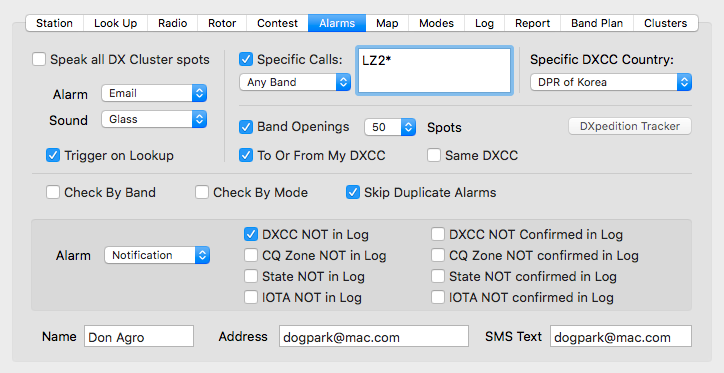
If Check By Band is checked, an alarm will be raised if for example if you have also checked DXCC NOT in Log and a call is spotted which you have in your log but not on the spotted band.
If
Check By Mode is checked, an alarm will be
raised if for example if you have also checked DXCC NOT
in Log and a call is spotted which you have in your
log but not in the spotted mode.
If
you want the alarm to trigger for any DXCC where the Band
and Mode have not been worked/confirmed in the same
QSO, enter this in the Terminal App followed by a return...
defaults write com.dogparksoftware.MacLoggerDX
alarms_both_band_and_mode -bool YES
If Skip Duplicate Alarms is checked, an alarm
which is a duplicate of any alarm in the previous 10 minutes
(same mode group, band and call sign) will not generate a new
alarm.
The Trigger on Lookup check box will raise the same alarms on a manual lookup as would be raised with an incoming dxcluster spot.
Both
the Specific Calls etc. Alarm and the Not
In Log Alarms can be set to None, a System Sound, a
speech advisory, an email, SMS Text or a notification.
Note:
SMS Text messages require that you enable Sending
SMS Messages on Your Mac as well as enabling MacLoggerDX
automation of the Messages app in System Settings / Privacy
& Security / Automation / MacLoggerDX / Messages.
Notification lets Mac OS X applications unintrusively tell you when things happen (Notifications will not display if the System Notifications preference Do Not Disturb is turned on).
The Band Openings Alarm will be raised after 10 spots (popup selectable) are received from the cluster of any DXCC from another reporting DXCC in a 30 minute period (i.e. USA reporting Japan 10 times within 30 minutes). The Band Openings popup sets the threshold number of spots which will raise an alarm.
The To Or From My DXCC check box restricts Band Opening Alarms to those to or from your DXCC Country.
The Same DXCC check box includes Band Opening Alarms for those to and from the same DXCC Country.
The MacLoggerDX Dock Icon Badge will show the Alarm count.